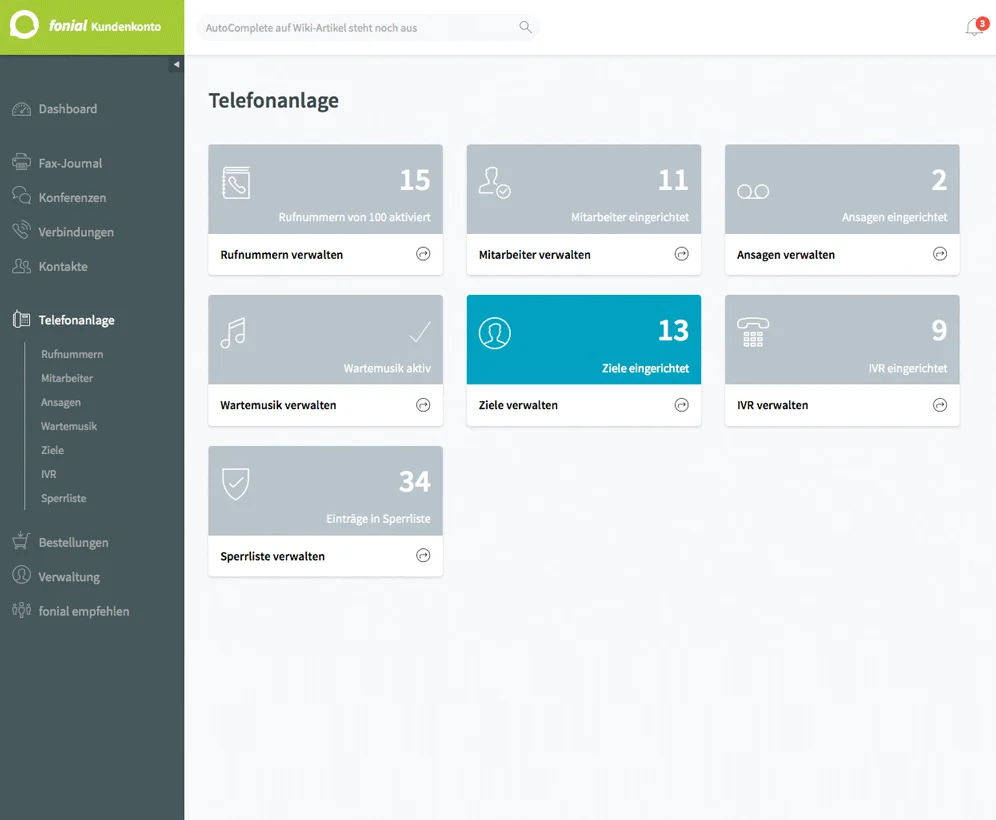
Einrichtung ihrer virtuellen Telefonanlage:

Von der Planung über die Inbetriebnahme bis hin zur laufenden Wartung – wir begleiten Sie bei jedem Schritt. Als zertifizierter fonial-Partner bieten wir Ihnen maximale Flexibilität und hohe Verfügbarkeit.

★★★★★

10,000+ users

Bitte geben Sie Ihre Telefonnummer ein.
Dieses Feld ist erforderlich.
Wieviele Mitarbeiter haben Sie?
In welcher Branche sind Sie tätig?
Dieses Feld ist erforderlich.

Warum Cloud-Telefonie?

Ihre Kommunikation. Günstig. Einfach. Flexibel.

Check Icon

Schnell eingerichtet & flexibel

Egal ob Büro, Homeoffice oder unterwegs – Ihre Telefonanlage ist überall verfügbar – in der Cloud.

Code Icon

Zuverlässig & ausfallsicher

Stabile Verbindungen und professionelle Erreichbarkeit – damit Ihre Kommunikation nie ins Stocken gerät.

Post Author Icon

Sicher & DSGVO-konform

Die Server unseres Partners fonial stehen Deutschland entsprechen so den hohen Anforderungen der DSGVO.

Was kann eine virtuelle Telefonanlage?

Eine Cloud-Telefonanlage bietet nicht nur maximale Flexibilität und deutlich geringere Kosten – sie bringt auch zahlreiche smarte Funktionen mit, die klassische ISDN-Anlagen nicht leisten können.

  • Warteschleife
  • Mailbox
  • Sprachmenü (IVR)
  • Microsoft Teams-Integration
  • Routing-Funktionen
  • Paralleles Klingeln
  • Fax-Druckertreiber
  • Mobile Integration
Replace Icon

Smart features

All the tools you need

Individuelle Rufweiterleitung

Made for everyone

Wir kümmern uns um die Technik, Sie um Ihr Business.

Wir unterstützen Sie von Anfang bis zum Ende bei der Einrichtung und Wartung Ihrer Telefonanlage.

  • Exklusive Partnerkonditionen bei fonial
  • Maßgeschneiderte Projektplanung
  • Call-Flows, Warteschleifen, Notfallpfade
  • Aufbau und Integration der Hardware

FAQs

Häufige Fragen

How do I change the logo?
Head to the Site Editor and then navigate to the Header Template Part. From there, click on the existing logo and then replace it with a block of your choice. You can use an Image block, SVG, Site Logo or Site Title block as the site logo, the choice is yours. We prefer to use SVGs for logos because they scale perfectly at all screen sizes and also support variable colors which makes them ideal for use with dark mode and animations.
What version of PHP do I need?
PHP 7.4 or higher is required however we recommend PHP 8 or above.
Does this theme require any plugins?
No, there are no plugins required by this theme. Everything you need to design an amazing website is provided by the framework.
How can I add animations to blocks?
Most core blocks have animation supported added. You can add and change transition effects without needing any code.
How do I create an FAQ accordion?
There are 2 ways to add an accordion to your site with our theme. First, you can use an existing accordion from any of the included block patters. Secondly you can create your own from scratch using the core List block. Since the accordion uses a core block variation instead of a custom block, your content will not be lost if you ever decide to switch themes.
How can I display blog posts on the home page?
This theme comes with multiple blog patterns that can be used to display posts on any page. Simply add a blog pattern to your home page template, or the page that is set as the Front Page. You can customize the Query Loop to suit your needs.
How can I save user dark mode preferences?
Cookies can be used to store user dark mode settings when clicking the toggle switch
How do I create a child theme?
We recommend using the create block theme plugin to create your own child themes. With a little know-how, they can be the perfect way to build your own website. They inherit all of the parent theme’s design which saves you a tonne of work and provides a head start for your next project.

Question not answered above? Contact us →